Screenshots
See it in the field
Main window, wizard flow, and export preview.
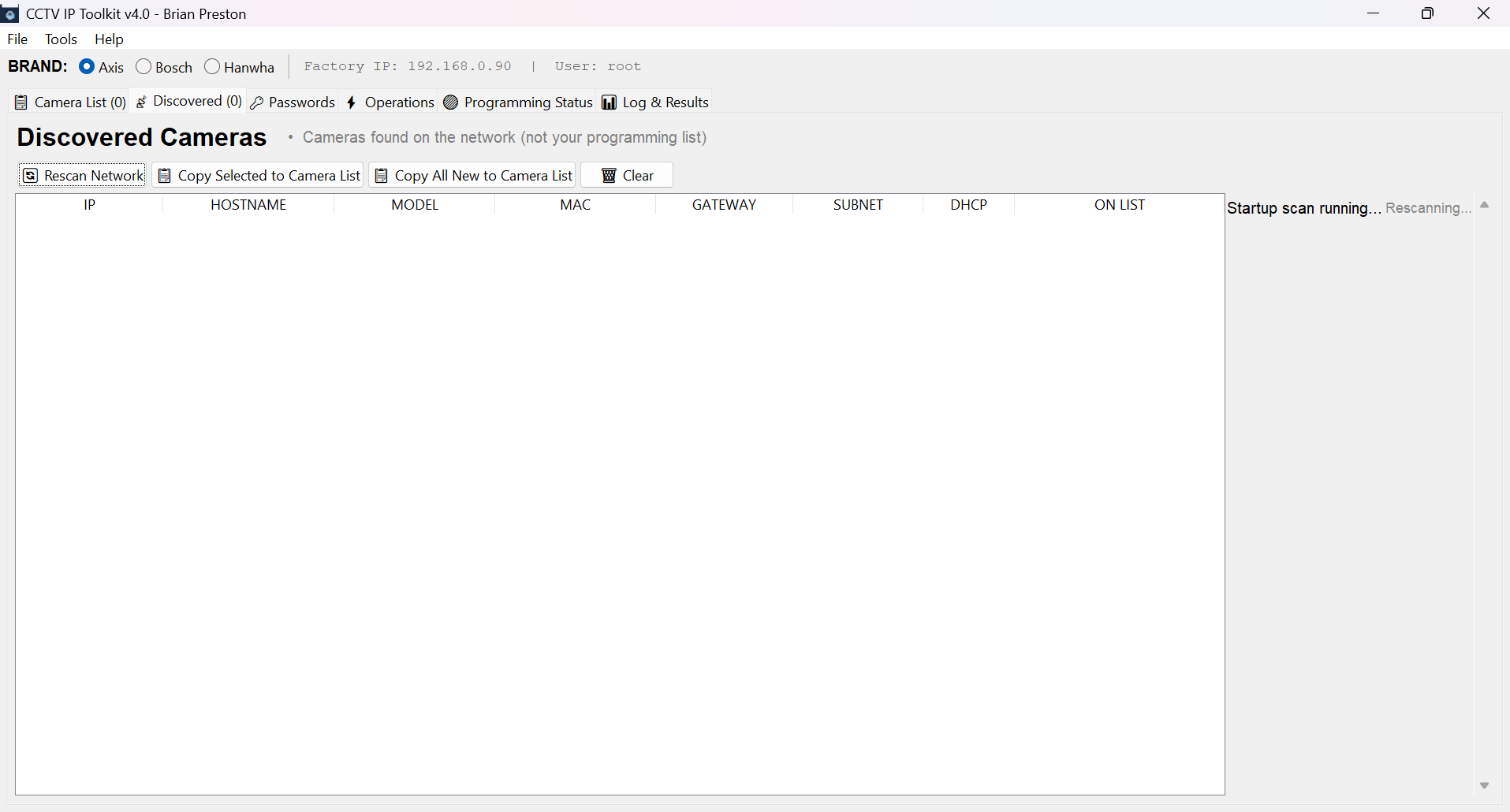
Main window · network scan
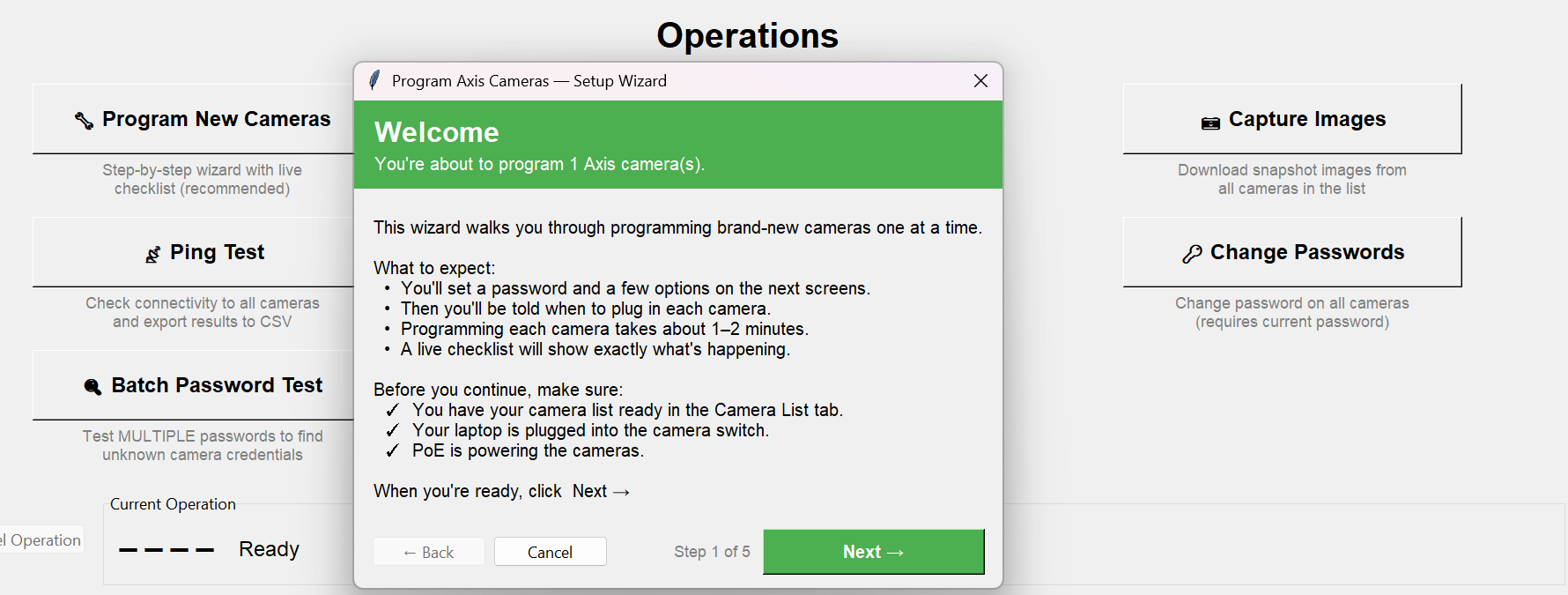
Programming wizard · step checklist
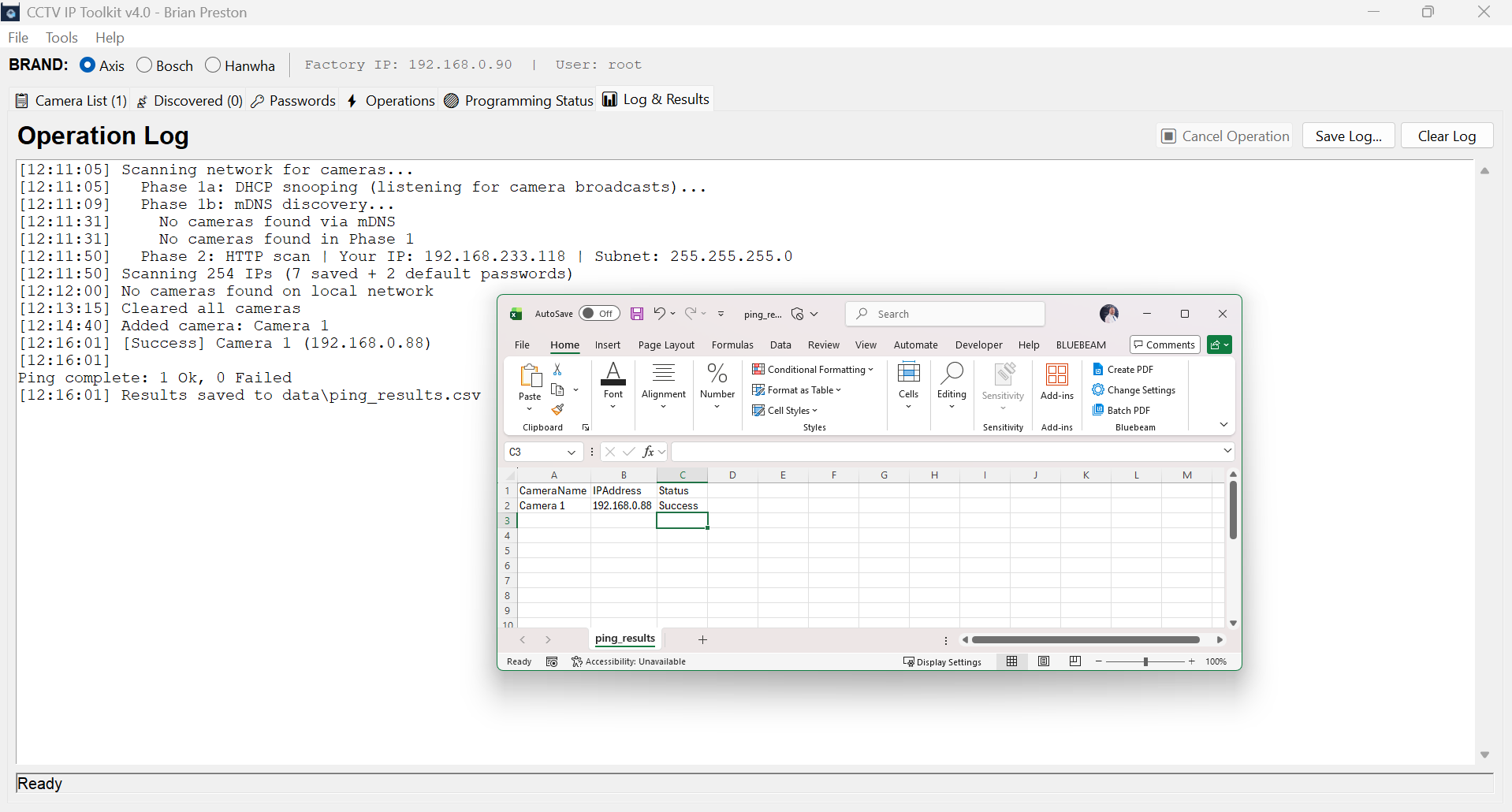
Exports · CSV + XLSX + snapshot JPEGs
Discover, program, test, and document Axis, Bosch, and Hanwha cameras from one Windows app. Built by an installation manager, for field techs.
No more juggling five tools per job. Discover, authenticate, program, verify — all in one window.
ARP sweep plus LLDP switch port lookup so you know exactly which port each camera is plugged into.
Built-in list of known passwords. Try them all at once, find the one that works, remember successful creds per camera.
Guided programming flow with live checklist, firmware capture, and automatic verification after each step.
Add service accounts in bulk during initial programming. Applied before network change to avoid re-auth hops.
Reach cameras on DHCP default IPs even when your laptop is on the target subnet. Works without NIC juggling.
Pulls firmware version, model, serial, and MAC off every camera. Exported to CSV/XLSX for the as-built binder.
Every programming step is followed by a real ping and auth check. No more "did it take?" uncertainty.
Pull a snapshot from each camera to prove it's online, aimed, and unblocked — bundled into the job report.
Programmed-cameras log, found-passwords report, and ping results all export cleanly for handoff docs.
Crisp on 4K laptops, readable on 1080p field tablets, clamps dialogs to the active monitor on multi-display rigs.
Per-job settings file. Pick your default interface, credential list, and export paths once — reused next time.
Primary API plus param.cgi fallback for older Axis firmware that doesn't accept modern VAPIX.
Detected automatically by MAC OUI + HTTP fingerprint. You can force a brand manually if auto-detect guesses wrong.
Main window, wizard flow, and export preview.
This tool touches cameras — devices built for watching. That earns extra scrutiny, and it should. So the entire source is published on GitHub. Read it, audit it, compile it yourself, modify it. If you don't trust the binary, don't run the binary — run the code.
What the app doesn't do:
.exe or rebuild from source.What it does need network access for:
Real person, real day-job: Brian Preston, Installation Manager — Data Centers, Convergint. Convergint employees can find me on internal Teams for employment proof.
Code signing: Release builds are not yet code-signed. An application to the SignPath Foundation (free OSS signing) was reviewed in May 2026; the project is still too young for their program and reapplying once it has broader community traction was explicitly invited. The current plan is Azure Trusted Signing (an OV-equivalent, Microsoft-issued certificate). Every release is still built in public by GitHub Actions from the tagged source, with a published SHA-256 for the bare exe — you can verify what you downloaded matches what CI built.
Windows, Python 3.10+, PyInstaller. build.bat does the rest.
1. Install Python 3.10 or newer (python.org) 2. Download and extractcctv-ip-toolkit-source.zip3. In the extracted folder, double-clickbuild.bat(It installs dependencies, bundles the app, and dropsCCTVIPToolkit.exeindist/.) 4. Run the exe. No installer — it's portable.
pip install requests pillow openpyxl pyinstaller
pyinstaller --onefile --icon=app.ico --name=CCTVIPToolkit axis_toolkit_v3.py
/config.js — the only fingerprint the toolkit had — came back as that form and the camera was discarded as “not a Bosch”. It now falls back to the camera’s RCP interface, which answers without credentials even in that state, and lists the camera as “needs password set”. Bosch programming also stopped trusting itself: reboot and factory reset no longer report success when the camera was simply unreachable, the DHCP-off write is checked and read back (a silent failure there is what made staged cameras forget their static IP after a power cycle), and a camera that already has a password can be re-run through the wizard instead of failing at the first step. Two crashes fixed. Using “factory default first” could kill the wizard’s worker thread with no error at all, leaving the checklist frozen on screen. And the temporary address the toolkit adds to your NIC was being written to Windows’ persistent store — which converts a DHCP adapter to static and survives a reboot; it is now genuinely temporary, and cleanup finds it even if the adapter index shifted. Post-reset the toolkit also waits at the correct factory address for the brand you chose, instead of always watching the Axis one. Interface cleanup. “Back to wizard” appeared twice on every power-user screen; there is one now, in a fixed place, hidden on Setup where it did nothing. The Setup flow and the Operations tab were two hand-maintained lists that had drifted — different names for the same job, and Validate Password unreachable from Setup — and now come from one registry. Messages no longer send you to a toolbar removed in v5.0 or a checkbox that no longer exists; where a fix was suggested that you could not perform, the toolkit now offers to take you to the right screen. “Wrong camera model” lets you skip that one camera instead of abandoning the whole run.Link-local: FAILED — Run as Administrator even though the app runs elevated by manifest. The real problem: 169.254.100.1 was still parked on a different interface — docking stations and USB NICs shift Windows interface indexes between runs, and the pre-flight pass and wait loop could each pick a different index, so Windows refused the duplicate add — and the code discarded the actual error text and blamed elevation unconditionally. v5.1.1: (1) a stray copy of the link-local address on any other interface is detected and evicted before adding; (2) a just-removed address in tentative/DAD state gets a 2s settle-and-retry; (3) if PowerShell’s New-NetIPAddress still refuses, the toolkit falls back to netsh … store=active — the same mechanism the subnet sweep already uses successfully on the same NIC; (4) genuine failures now log the real Windows error, and “Run as Administrator” is only ever printed when the process truly isn’t elevated. No camera-side changes.MAC / MAC Address / macaddress headers and auto-detects MAC columns by value pattern). How it works: discovery runs continuously; every camera that appears on the wire has its MAC checked against the loaded list. Known MAC → that row’s config is programmed and the camera moves to its new IP. Unknown MAC → silently skipped before any mutating action — no factory reset, no programming — so it’s safe on sites with hundreds of pre-existing production cameras on the same subnet. Idempotent: already-programmed cameras stay done across re-runs. NEW pipeline step #11 “Confirm MAC at new IP matches CSV row”: after programming, the toolkit re-fetches the MAC from the camera at its new address and verifies it equals the row’s MAC — if two cameras somehow got each other’s configs, this fails loud and marks both rows failed. Under the hood the beta cycle added serious discovery muscle that benefits every mode: reverse ARP lookup (listening to cameras announcing themselves), raw L2 frame capture via scapy/npcap, and SSDP/mDNS multicast joins on the link-local subnet for multi-IP NICs. The classic “plug in one at a time” wizard is completely unchanged — Switch Loading is a separate button for the bulk case. Field-validated 2026-05-13 on live M1075-L installs.set_network path (90s → 5s on FW 10.x), bundled DHCP MAC filter, wizard re-entry guard, ONVIF CreateUsers/DeleteUsers fixes, instant camera-found via bundled DHCP lease state, MAC editor in the camera list.set_network’s retry loop — previously a click could wait up to 53 seconds for the 15s ReadTimeout × 3 attempts to play out. Bundled DHCP no longer fails with cryptic WinError 10049 when the dropdown’s stored IP is stale — re-resolves current IPv4 by InterfaceIndex at server-start time, with a friendly translation when the NIC has no IPv4. EXPORT_DIR honors Windows User Shell Folders redirection (Nextcloud / OneDrive / Dropbox-mapped Documents) and auto-migrates existing CSVs / wizard logs / screenshots from the legacy default profile path on first launch. Beta builds get an unmissable v4.5.3bN.<sha> ⚠ BETA in the title bar. Icon loader switched to iconphoto via PIL so PNG-encoded ICO entries actually load (Tk’s plain iconbitmap was silently falling back to the default feather). Multi-home cleanup now fires immediately on Cancel instead of only on successful runs. Cooked over a marathon real-world install session 2026-05-10 against P3265-LV + P3268-LV with a stray managed PoE switch on the programming segment.param.cgi Network → auto-alias just that /24 on the selected NIC. One alias, one camera, exact subnet. Stage 2 (fallback): blind /24 sweep across six common deployment subnets (10.0.0, 10.0.1, 192.168.0, 192.168.1, 192.168.50, 172.16.0) for cameras smart-pass missed. Per-camera factory-reset prompt with inline “Provide camera password” fallback if the saved walk fails. Plus: Tools → Find Camera Anywhere… (manual one-off discovery), wait-loop heartbeat every 15s, set_network diagnostic logging on every leg, wizard auto-saves chosen password to Passwords list, atexit cleanup so closing the app tears down temp NIC aliases. Cooked over a long real-world reuse session against a P3265-LV with a hardcoded 10.0.0.26 from a prior site, on a programming NIC with no 10.0.0.x address. Beta1 → beta10 iteration log lives in the cctv-ip-toolkit Gitea repo.10.0.0.26 but your programming NIC is on 192.168.0.0/24), the wizard now offers per-camera — with explicit consent — to add a temporary same-subnet alias to the selected interface so it can actually reach the camera to factory-default and reprogram it. Closes the silent “discovered but unreachable” gap that previously made the wizard skip such cameras during the “Waiting for camera…” loop. Aliases register in the same multihome_state.json as the existing Auto Multi-Home flow; cleanup runs at wizard end and is crash-resilient on next launch. Requires admin (same as Auto Multi-Home).RestartApplications=no so the in-app update flow also stops trying to auto-relaunch the closed instance.cmd /c "timeout /t 3 && start "" <exe>" so the new process starts 3 seconds after Inno’s file replacement settles — well past any AV / OS file-lock release window. The in-app updater UI now ends with the new version auto-launching, no Start Menu click needed..txt, .csv, .tsv, .md, .list. Markdown files have passwords extracted from inside fenced code blocks (headers, prose, and policy sections are ignored). CSV/TSV takes the first non-empty column per row. Plain text is one password per line. Blank lines and # comments skipped, dedupes against the existing list, popup reports "Imported N new (X already in your list)". Convergint techs can now drag-and-drop the password list .md instead of copy-paste-trim.beta/** branches publish as prereleases automatically. Local build.bat is now a contributor-build-from-source fallback only. SignPath Foundation integration block ready to enable in the workflow once the OSS code-signing application is approved.shellexec flag so ShellExecute is used — UAC prompt + app launches normally. The in-app updater flow benefits too: post-install relaunch goes through ShellExecute.No ticket system, no account required. You fill out a short form, it emails me. If you leave your email address I'll write back.
Portable. No installer. Run it off a USB stick.